

At any given moment, someone, somewhere, is trying to break into a website.
Not necessarily yours specifically—but if your site is vulnerable, it won’t take long before it’s found.
The reality is simple: most hacks aren’t targeted. They’re automated. Bots scan thousands of websites every hour looking for weak passwords, outdated software, and easy entry points.
The good news? You don’t need to be a cybersecurity expert to dramatically reduce your risk. Here’s how.
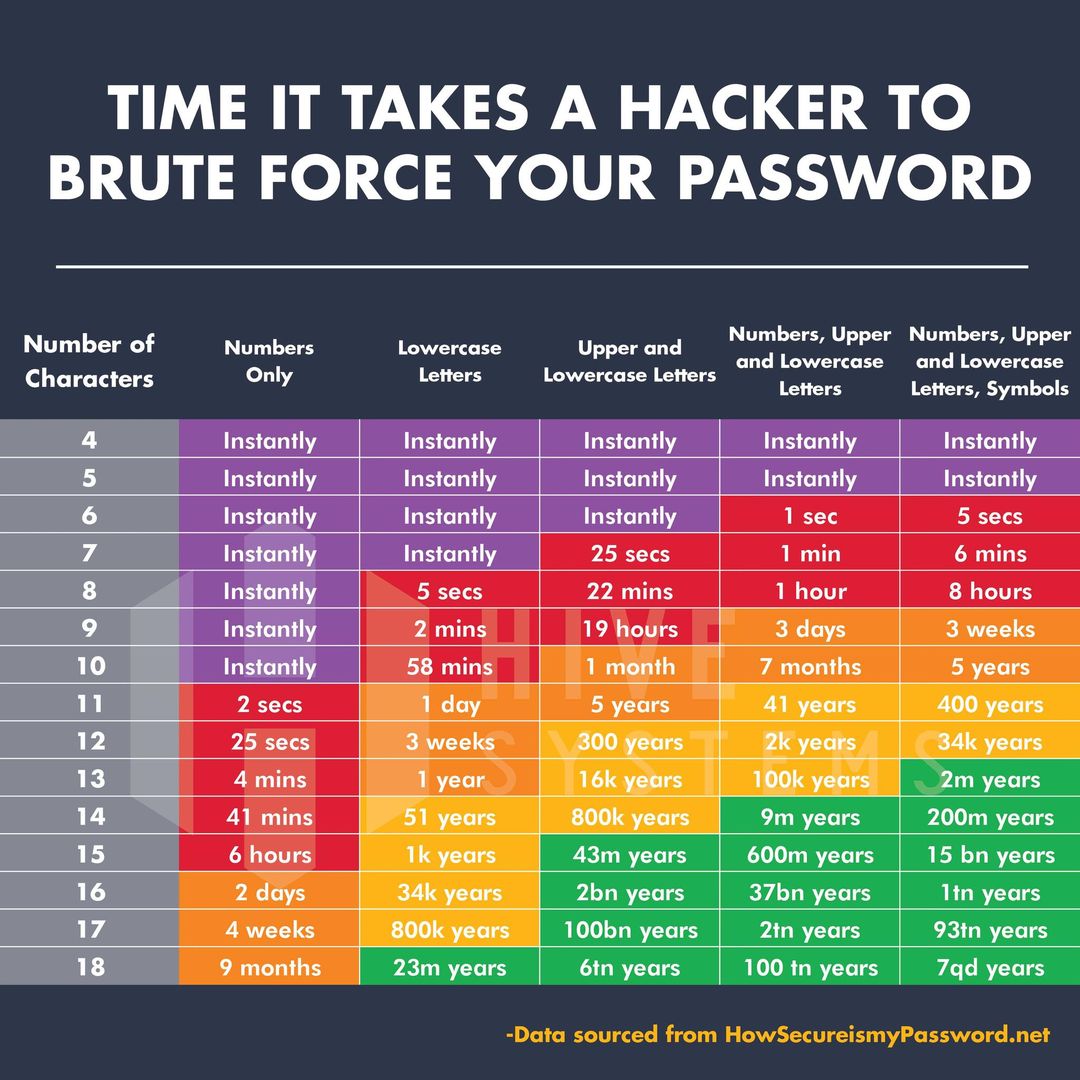
Start with the Basics: Passwords & Access
Let’s begin with the obvious—because it’s still one of the biggest causes of breaches.
Use genuinely strong passwords
If you can remember your password, it’s probably not strong enough.
- Use long, random combinations of letters, numbers and symbols
- Avoid reusing passwords across platforms
- Use a password manager to store them securely
A simple but effective tip: adding unusual characters (like commas) can even break certain types of stolen data formats.
Enable Two-Factor Authentication (2FA)
If you do just one thing from this article—do this.
2FA adds a second layer of protection, usually via:
- A mobile app (like Google Authenticator)
- A text message code
Even if someone gets your password, they still can’t get in.
Control who has access
Not everyone needs full admin access.
- Remove old users (ex-staff, old agencies)
- Assign the lowest level of access required
- Avoid shared logins
Stay Alert: Email & Human Error
Most successful hacks don’t start with code—they start with people.
Spot phishing attempts
Be cautious of emails asking you to:
- Log in urgently
- Reset passwords
- “Verify” your account
Check:
- Does it address you by name?
- Does the domain look correct?
- Does the language feel off?
Hover over links (don’t click) to inspect the destination.
A classic trick:
hsbc.secure-login.com❌ (fake)secure.hsbc.co.uk✅ (legitimate structure)
Your Website Itself: The Biggest Risk Area
This is where many articles stop—but it’s where most hacks actually happen.
Keep your CMS and plugins updated
Outdated software is the #1 cause of website hacks.
Platforms like:
- WordPress
- Joomla
- Drupal
…regularly release security updates.
Hackers actively scan for sites that haven’t applied them.
👉 Best practice:
- Update your CMS regularly
- Update plugins/extensions
- Remove anything unused
Be selective with plugins and extensions
Not all plugins are created equal.
Poorly coded or abandoned plugins are one of the biggest vulnerabilities—especially on WordPress.
- Only install what you actually need
- Check reviews and update history
- Avoid “nulled” or pirated plugins entirely
Protect against brute force attacks
Bots will try thousands of password combinations automatically.
Protect your login area by:
- Limiting login attempts
- Adding CAPTCHA
- Avoiding default usernames like “admin”
Add a Security Layer: Firewalls & Monitoring
Use a Web Application Firewall (WAF)
A WAF filters incoming traffic and blocks malicious requests before they reach your site.
Services like:
- Cloudflare
- Sucuri
…can block:
- Known attack patterns
- Suspicious IP addresses
- Automated bots
It’s one of the most effective “hands-off” protections available.
Monitor your site for suspicious activity
You can’t fix what you don’t know about.
Good monitoring will:
- Alert you to unusual login attempts
- Detect file changes
- Flag malware injections
Don’t Ignore Your Hosting
Your website is only as secure as the server it sits on.
Cheap hosting often lacks:
- Proper isolation between websites
- Malware scanning
- Proactive patching
👉 Look for hosting that includes:
- Daily backups
- Security monitoring
- Firewall protection
Secure Your Domain (The Overlooked Weak Link)
This is one of the most dangerous—and most ignored—areas.
If someone gains access to your domain registrar, they can:
- Redirect your website
- Hijack your emails
- Send your customers to a fake version of your site
Imagine a cloned version of your ecommerce store taking payments—and you don’t even realise.
👉 Protect it by:
- Using a strong password
- Enabling 2FA
- Locking your domain where possible
Always Use HTTPS (SSL)
If your website isn’t using HTTPS, it’s vulnerable.
An SSL certificate:
- Encrypts data between user and server
- Prevents interception
- Builds trust with users
- Is essential for SEO
Backups: Your Safety Net
Even the best security can’t guarantee 100% protection.
That’s where backups come in.
- Daily backups are essential
- Off-site backups are better
- Multiple restore points give flexibility
👉 In many cases, recovery—not prevention—is what saves a business.
Security Is About Layers
There is no single solution that makes your website “safe”.
Security works like layers:
- Passwords
- 2FA
- Updates
- Firewalls
- Monitoring
Each one adds friction.
And most attackers? They’ll simply move on to an easier target.
Why Platform Choice Matters
Not all CMS platforms are equal when it comes to security.
For example:
- Joomla offers strong access control out of the box
- WordPress is highly flexible but relies heavily on plugins
- Drupal is very secure but more developer-focused
The key isn’t just the platform—it’s how well it’s implemented and maintained.
How We Help Keep Your Website Secure
Security isn’t something you set and forget.
It’s ongoing.
As website developers and hosts, we take a layered approach:
- Secure CMS builds (often using Joomla for its robust core security)
- Managed updates and maintenance
- Daily backups and recovery options
- Firewall protection and traffic filtering
- Country/IP blocking where appropriate
- Ongoing monitoring
The goal isn’t just to prevent attacks—it’s to minimise risk and respond quickly if anything happens.
Concerned About Your Website Security?
If you’re not sure how secure your current setup is, you’re not alone.
Most websites we review have at least one significant vulnerability—often without the owner realising.
If you’d like a straightforward, no-jargon review of your site security, feel free to get in touch.
No pressure. Just clarity.

